Discover
Record board-wide dumps, analyze likely score formats, and test candidate address ranges across supported BCD, integer, implied-zero, and special-case decode methods such as Galaga-style display digits.
New project
A discovery and export tool for finding arcade score RAM, narrowing down candidates, and turning the winning addresses into second-screen hi-score layouts you can refine further in the online MameDuo Layout Builder.

Start here when you need to discover score addresses or prove which candidate updates live in-game. Once the scanner gives you a clean final or probe layout, bring that result into the online Layout Builder if you want to add bezels, tweak presentation, or switch imported hi-score digits to artwork-based styles.
What it does
Record board-wide dumps, analyze likely score formats, and test candidate address ranges across supported BCD, integer, implied-zero, and special-case decode methods such as Galaga-style display digits.
When more than one winner survives, create probe layouts and compare them live in MAME so the screen tells you which address updates immediately and which one is only a parked or copied score slot.
Build final centered stacked score layouts from P1, P2, HI, and helper rows, then carry those exported hi-score layouts into the Layout Builder if you want bezel work, second-screen polish, or digit-art styling.
Core workflows
Exact
Use this when you believe the visible score is already stored directly as BCD or integer bytes. Enter the visible score, record full-board blocks, and let the scanner replay many exact score modes.
Delta
Use this when the score changes are easier to detect than the final format. Record multiple snapshots before and after scoring, then rank hot ranges and isolate a focused cluster for deeper checking.
Simple Mode
Best for quick score discovery: record all blocks, analyze across the whole board, fill winner boxes, and create probe or final layouts without needing manual block stepping.
Advanced Mode
Best for discovery work: manual block stepping, manual mode forcing, focus ranges, turn-flag hunting, helper rows, and database saving once the result is solid enough to keep.
Screens
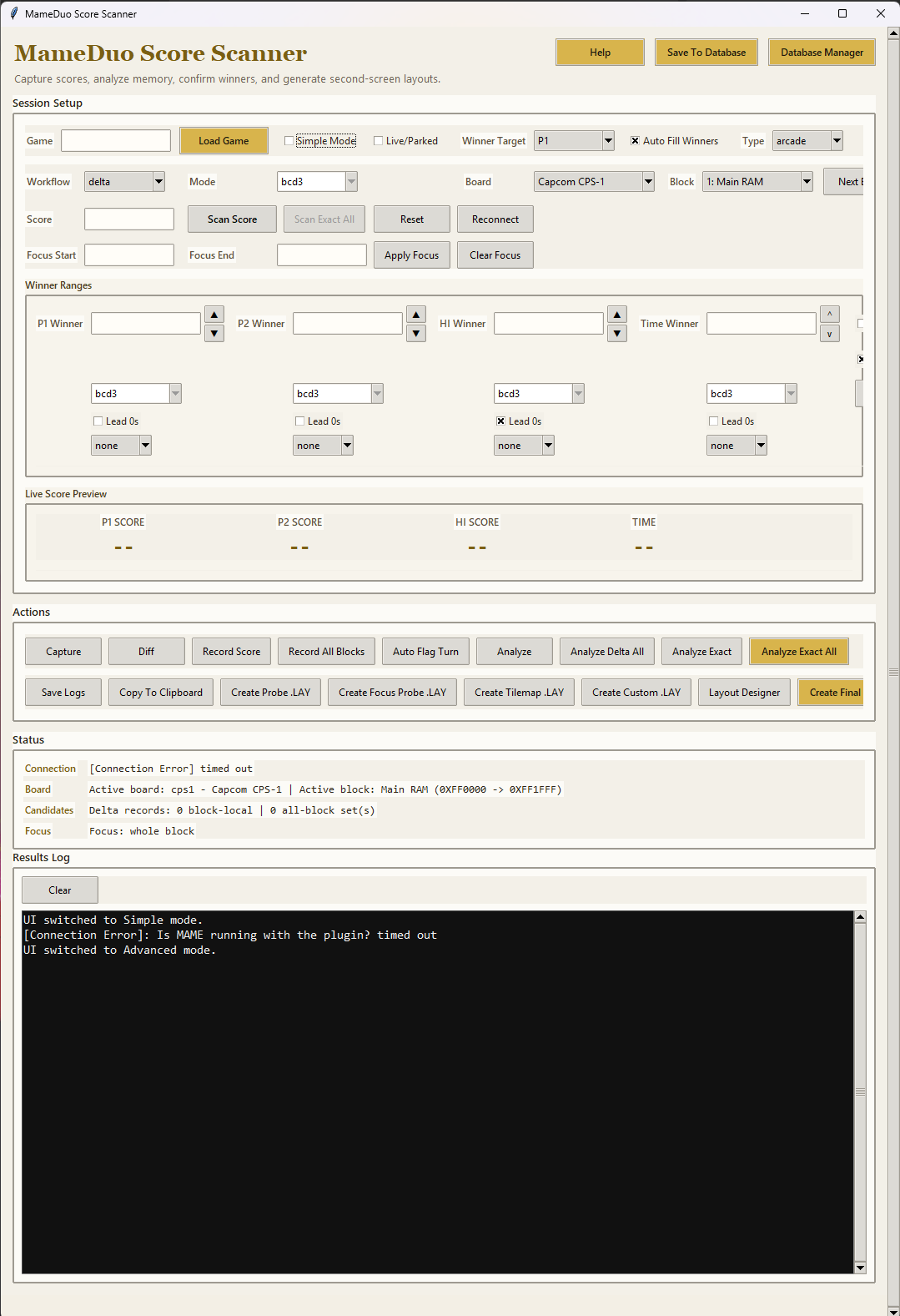
The menu is built around recording, analyzing, probe generation, winner boxes, and export. It is designed to move from raw score dumps toward a final result without losing the investigative steps in between.
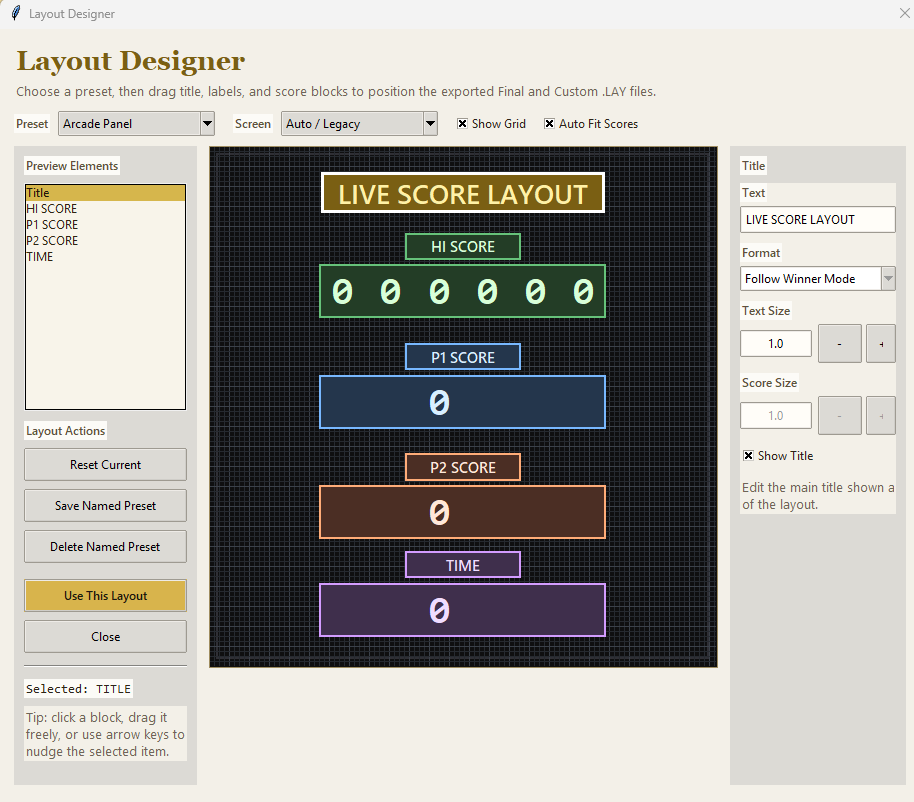
Layout Designer handles preview and export arrangement for titles, labels, score rows, timers, and helper rows. It follows the real digit count for the selected mode and is especially useful before passing a layout into the online builder.
With the Builder
Use MAME Score Scanner to confirm the real live score ranges, create a final or probe .lay,
and lock in P1, P2, HI, TIME, or helper-row behavior.
Bring that exported hi-score .lay into the MameDuo Layout Builder if you want to add bezels,
second-screen cabinet presentation, local artwork refs, or grouped hi-score positioning controls.
Use the builder to polish the imported score layout with bezel artwork and optional digit-art styles from imported hi-score tools, then export the presentation-ready layout you actually want to keep in MAME.
Triggers and active images
Score Scanner can export active trigger rows alongside score data. A trigger is a live game condition rather than a score: for example, a player-active state, a warning, a health condition, or another byte value that changes while the game is running.
Confirm the game behaviour first, then include the Active Trigger element in the exported .lay.
The exported element is what gives Layout Builder a real live-memory condition to work with; a normal text
label on its own cannot drive artwork in MAME.
When the layout is re-imported, the trigger appears in the Imported trigger images panel. Add a static image or an animation there to replace the visible trigger placeholder while keeping the exported trigger logic.
Use one image for a simple on/off indicator, or animated frames for a warning icon, arrow, or badge. Animations can loop, or play once and hold on their last frame when the trigger becomes active.
Recommended workflow
Important
If Layout Builder shows a trigger image panel but nothing changes in MAME, the imported layout may not contain the matching Active Trigger element or its live values may never turn on. Create or export the trigger from Score Scanner first, then re-import the updated layout.
Examples
bcd4rev Namco example
Frogger: 5-digit bcd2rev_implied0 workflow
Galaga: display-digit decode path
Galaxian: reversed-byte 3-byte BCD
Donkey Kong: strong winners even with mode overlap
Popeye: live and parked slot behavior
Genesis / Sonic: mixed helper data workflow
SNES Mario World: timer helper decoding
Guide reference
The scanner helps you discover score RAM for arcade games so you can build a second-screen
.lay file. In the best case it finds a winner automatically. In harder cases it narrows the
field and creates probe layouts so you can verify the right address visually.
Board families
The board dropdown is meant to match clues users can see in MAME, such as Nintendo or Z80, not just internal scanner preset names. Start with the family that best matches the game's hardware or source information if you know it.
Important tools
Winner boxes are the main handoff point between analysis and export. They should hold the full range, not just the first byte, for example `0x60B5->0x60B7`. If the scanner finds a result automatically it can place it in the currently selected winner target box.
You can also type or edit these boxes manually after confirming a probe. Each field can keep its own mode, leading-zero preference, and optional display-adjust helper of `none`, `+1`, or `-1` for preview/export-only corrections.
Advanced reference
Layout Designer affects preview and export only. It lets you move the title, labels, and score rows, rename exported text, and choose row digit formatting for HI, P1, P2, and TIME using trim, minimum-2-digit, fixed-width, implied-trailing-zero, follow-winner, or timer-specific display styles.
It follows the real digit count for the selected mode, uses matching label and score colors, repacks only visible rows, auto-applies presets when selected, and remembers your current working layout while the app session stays open.
Time helper rows can also follow timer-specific export styles or digit-style helper decoding, and the left Preview Elements list remains the safest way to manage the layout because hidden rows stay selectable there.
`Save To Database` is the way the scanner gets smarter over time. It stores the game name, board family, block, current mode, P1/P2/HI ranges, optional Time helper range, notes, solved status, and per-field preview/export helpers such as leading zeros and display adjust.
Extra helper rows are also preserved when used. For console systems, make sure the Game box contains the real game title rather than a generic system name such as `genesis` or `snes` before saving.
Special handling
Some console systems boot through one shared artwork\system\default.lay, which makes per-game console layouts
awkward if you want each cart to have its own small file. `PreMame` is an optional wrapper that solves that by
checking the loaded cart name before MAME starts, temporarily swapping in a matching per-game .lay
if one exists, and restoring the original `default.lay` after MAME closes.
.lay exists, PreMame temporarily uses it as `default.lay` for that launch..lay exists, the normal `default.lay` remains in use..lay files.If the scanner gives you a clean address winner, treat that as the strongest signal. If the mode is still ambiguous, keep testing live in a layout until the visual result tells you which decode is correct. When in doubt, trust the game screen more than the raw candidate list.
Ready to try it
Download the current guide, use the scanner to discover or verify the score data, then open the online Layout Builder if you want to import that hi-score layout and dress it up with bezel artwork or custom digit styles.